Purpose
Read data from an Access database.
Remark
An Access file can contain tables, views and even interactive dialogs.
We just want to read a table from the database so we can use the OLEDB driver.
To do more complex things it is possible to use the Microsoft interop interface
to interact with an Access application.
Solution
We will call a VB.NET method that uses the Microsoft.ACE.OLEDB driver. Usually this driver is already
present when
Microsoft Office is installed on the client PC. Unfortunately it is not installed with Office365 so it might be
necessary to install the
Microsoft Access Database Engine 2010 Redistributable
or a more recent version.
Example
Our purpose is to let the user enter a product name and get a
list of all orders which contain the product as an order item.
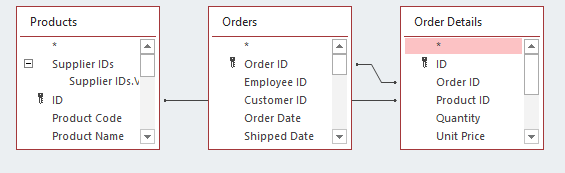
As there is not one single table in the database containing all
the information we have to
use a SQL statement that joins together 3 tables.
Result
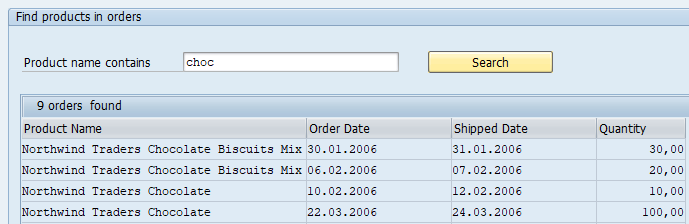
Creating the SQL statement
We can use Microsoft Access to create a new view using the built in designer. The designer will also create an SQL expression
that we can use as a parameter for the VB.NET call (change to the SQL view by right-clicking on the tab for the view).
GuiXT
Box     (1,1)    (18,103)          "Find products in orders"
InputField (3,3) "Product name contains" (3,26) size=30 name="pname"
Pushbutton (3,61) "Search" process="search_orders.txt" size=(1,17)

 if not V[ordercount ]
  Set V[ordercount ] 0
endif


Table (5,3) (18,100) name="orders"  rows="&V[ordercount ]"  _
title="&V[ordercount ] orders  found" fixedColumns=4

Column "Product Name" size=40 name="product name" -readOnly
Column "Order Date" size=20 name="order date" -readOnly
Column "Shipped Date" size=20 name="shipped date" -readOnly
Column "Quantity" size=12 name="quantity" -readOnly  -alignRight
InputScript "search_orders.txt":
GuiXT
// Build select statement
Clear V[sql]
Set V[sql] "&V[sql] SELECT Products.[Product Name], [Order Details].[Product ID], "
Set V[sql] "&V[sql]  [Order Details].Quantity, Orders.[Order Date], Orders.[Shipped Date]"
Set V[sql] "&V[sql]   FROM Products"
Set V[sql] "&V[sql]   INNER JOIN (Orders INNER JOIN [Order Details]"
Set V[sql] "&V[sql]   ON Orders.[Order ID] = [Order Details].[Order ID])"
Set V[sql] "&V[sql]   ON Products.[ID] = [Order Details].[Product ID]"
Set V[sql] "&V[sql]   WHERE [Products].[Product Name] LIKE '%&V[pname]%'"

 // Clear table cell variables
Clear V[orders.cell.*]

// Clear table status
Clear V[orders.stat.*]

 // Read database, row count is returned
CallVB ordercount = accessdotnet.access.read accessfile:="C:\access\northwind1.accdb" varname:="orders.cell" command:="&V[sql]"


Return
VB.NET Coding:
VB.NET
Imports guinet

Public Class access

    Private guixt As New guinet.guixt
    Public Function read(ByVal accessfile As String,
                         varname As String, command As String) As Integer


        Dim MyConnection As New OleDb.OleDbConnection(
            "provider=Microsoft.ACE.OLEDB.12.0;Data source='" & accessfile & "'")

        Dim Cmd As OleDb.OleDbCommand = New OleDb.OleDbCommand(command)
        Cmd.Connection = MyConnection

        Dim n As Integer = 0
        Try

            MyConnection.Open()
            Dim reader As IDataReader = Cmd.ExecuteReader()
            While reader.Read

                n += 1

                For k As Integer = 0 To reader.FieldCount - 1


                    Dim colName As String = reader.GetName(k).ToLower
                    Dim value As String = ""

                    Try
                        value = reader.GetValue(k)
                    Catch ex As Exception
                        ' Type might be DBNull
                    End Try

                    If reader.GetFieldType(k) = GetType(System.Decimal) Then
                        value = reader.GetDecimal(k).ToString("N2")
                    End If

                    ' Fill GuiXTt table variable
                    guixt.SetVariable(varname & "." & colName & "." & n.ToString, value)
                Next
            End While

            MyConnection.Close()

        Catch ex As System.Data.OleDb.OleDbException
            Dim errorMessages As String = ""
            Dim i As Integer

            For i = 0 To ex.Errors.Count - 1
                errorMessages += "Index #" & i.ToString() & ControlChars.Cr _
                               & "Message: " & ex.Errors(i).Message & ControlChars.Cr _
                               & "NativeError: " & ex.Errors(i).NativeError & ControlChars.Cr _
                               & "Source: " & ex.Errors(i).Source & ControlChars.Cr _
                               & "SQLState: " & ex.Errors(i).SQLState & ControlChars.Cr
            Next i
            MsgBox(errorMessages)


        Catch ex As Exception
            MsgBox(ex.Message)
        End Try

        'Number of rows
        Return n

    End Function

End Class
Components
InputAssistant + Controls